


Kinedu: Baby Development
3.2838.00 Reviews
App Specs
- Version
- 2.40.0
- Updated On
- License
- Free
- Downloads
- 5,000,000+
- Developer
- Kinedu INC
- Categories
- Parenting
- Platform
- Android, iOS
Screenshots


 Analysis by AppCompare
My most useful habit with Kinedu is treating it as a prompt for a short moment with my baby, not as another parenting checklist I have to finish. When the day is already full, a suggested activity can give me an easy place to start; when it is not a good fit, I can simply choose something else. That balance matters: support should make time together feel more manageable, not turn development into a scorecard.
A routine that fits real days
I would use the activity plan at a predictable point in the day, such as after a nap or before a usual play period, rather than checking the app every time I have a spare minute. I can look over an activity first, gather anything it calls for, then put the phone aside and focus on the child. This small routine makes the guidance easier to use and keeps a screen from competing with the interaction the activity is meant to encourage.
A realistic example is a parent with ten minutes before leaving home. Instead of searching online for an age-appropriate idea, they can open Kinedu, choose a suitable activity, and decide whether it works in that moment. If the baby is tired or the setting is noisy, postponing it is sensible. The app is most helpful when it offers options, not when it dictates the day.
Make tracking useful, not stressful
Milestone tracking can be more valuable as a memory aid than as a daily report card. I would add observations when something meaningful happens, then use them to recall changes over time or prepare a clearer conversation with a pediatric professional. A missed activity or an uneven week does not tell the whole story of a child’s development, so I would avoid treating app entries as a diagnosis or a substitute for professional advice.
There is also a practical trade-off in logging details: recording a few memorable milestones may help, while trying to document every little change can make the process feel like work. Families who already keep notes elsewhere may prefer to use Kinedu selectively, rather than duplicate their entire routine. The best tracking habit is the one a parent can keep without feeling pressure to make the record complete.
Who benefits most from the guided approach
I can see Kinedu being especially useful for a first-time parent who wants ideas but does not want to assemble a plan from scattered articles, or for caregivers who share time with a baby and need a common source of activity suggestions. Its mix of play ideas, milestone tracking, and learning material brings several kinds of support into one parenting app. It can also help a relative or babysitter understand the kind of simple play a parent wants to encourage, provided the parent explains what is appropriate for that child.
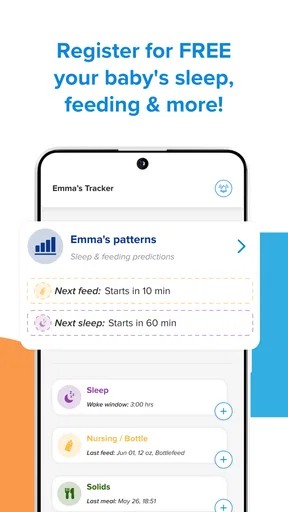
On the other hand, a parent who prefers an unstructured approach, already has trusted resources, or wants only a basic feeding or sleep log may find the broader experience more than they need. A simple notes app or a dedicated tracker can be a better fit when the main goal is recording routine events rather than finding developmental activities. I would choose Kinedu for guided play and learning support, not just because I want a place to enter data.
Worth Reading Before You Choose

Baby Panda World Brings Quick Play to Modern Phones, but Its Game Library Feels Busy

ESPN’s Live Game View Makes Following Close Games Easier

QuizzLand Review: A Good Fit for Short Trivia Breaks, Not Every Player

Basketball Stars: Multiplayer Is Fast, but Can It Recover When Matches Go Wrong?

WEBTOON Turns Phone Updates Into a Better Reading Routine

Link to Windows Runs on Shared Habits, Not Social Feeds
What to check before settling into a habit
Kinedu is free to download, but it also offers in-app purchases ranging from $0.99 to $299.99 per item. I would explore the free experience first and check what is included before committing to a purchase, especially if I only need a few ideas each week. The range makes it worth being deliberate about what I actually want to use; a paid option is not automatically worthwhile simply because it offers more material.
The app is listed for Everyone and requires Android 6.0 or later. It is developed by Kinedu INC, and version 2.28.0 is the current version. Its 3.1 average rating across around 42,000 ratings is a useful reminder that experiences differ: I would test whether the layout and the suggested routine suit my household instead of assuming that popularity guarantees a match. More than five million installs show that many families have tried it, but my own comfort with the workflow matters more.
Parents comparing options should think about what they want to replace. A search engine offers broad answers but requires more effort to judge and organize; a paper calendar or basic tracker is simpler for recording events; Kinedu’s appeal is the combination of activity guidance and development-related resources. That combination is convenient, though it may feel less direct than a single-purpose tool. I would keep another trusted source for medical questions and use this app for practical play ideas and everyday learning.
That distinction also helps answer whether the app can tell a parent if a child is developing normally: I would not use it that way. Its activities and milestone records can help organize observations, but concerns about a child’s development belong in a conversation with a qualified professional. The app is a companion for everyday parenting, not an assessment.
Ever wondered how to keep track of your baby’s development while juggling the chaos of parenthood? Well, that’s where Kinedu comes in. As a new parent, it’s like having a pocket-sized expert to guide you through those critical early years. Let’s dive into what makes this app a go-to for many parents out there.
First Impressions and Features
When I first opened Kinedu, I was greeted by a clean and user-friendly interface. It’s super easy to navigate, which is a blessing when you’ve only got one hand free because the other is probably holding a squirmy baby. The app is designed to help track and support your child's development from 0 to 4 years old.
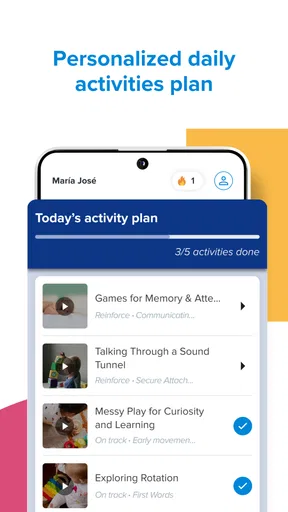
What caught my attention right away was the customized activity plan. Based on your baby’s age and developmental stage, the app suggests daily activities that are not only fun but also promote growth in key areas like motor skills, cognition, language, and social-emotional skills. Think of it as a personalized curriculum for your little one.
Detailed Activity Descriptions
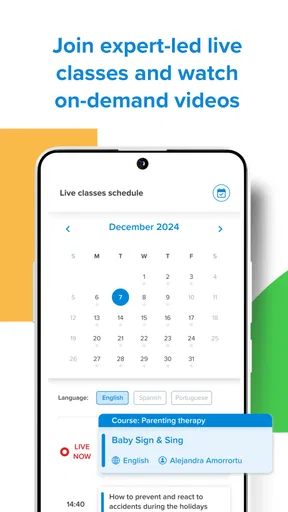
Each activity comes with detailed instructions and a short video demonstration. This is a lifesaver for those of us who learn better visually. The activities are sorted by skill and age, so it’s easy to find something suitable, whether you’re at home or on the go.
For example, one activity suggested was simple peek-a-boo, but the app explained how this helps build object permanence—a crucial cognitive milestone. Who knew a game that’s been around forever had so much science behind it?
Tracking Progress
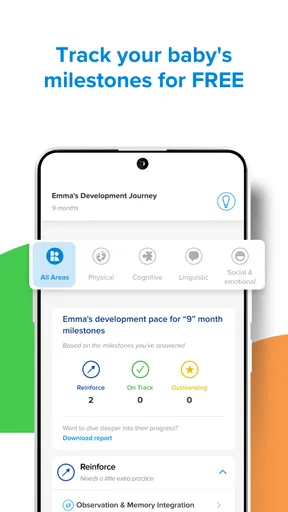
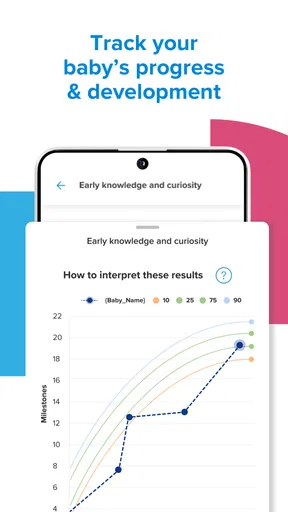
Kinedu doesn’t just throw activities your way and leave you hanging. It allows you to track your baby’s progress over time. You can record milestones and achievements, which is not only satisfying but also provides valuable insights into your child’s development. Plus, it’s a great way to share updates with family members who are eager to see how the little one is doing.
Expert Advice and Articles
The app is packed with articles and advice from early childhood experts. Topics range from sleep tips to understanding baby cues, feeding, and more. It’s like having a mini library of parenting wisdom at your fingertips. And let’s face it, when you’re up at 3 AM, Googling why your baby won’t sleep, having reliable info is a game-changer.
Why Parents Love It
Many parents are singing the praises of Kinedu for its ability to make a daunting task feel manageable. The thought of ensuring your baby hits all their developmental milestones can be overwhelming, but this app breaks it down into bite-sized, actionable steps.
One standout feature for me is the community aspect. You can join forums and connect with other parents. Sharing stories and advice with people going through the same highs and lows can be incredibly reassuring.
A Few Things to Consider
While Kinedu offers a free version, some of the more advanced features require a subscription. If you want access to more in-depth insights and a wider range of activities, it might be worth considering. The investment is small when you think about the value it adds to your child’s development journey.
Final Thoughts
All in all, Kinedu is like having a parenting coach in your pocket. It’s intuitive, comprehensive, and genuinely helpful in supporting your baby’s growth. Whether you’re a first-time parent or adding another to your growing family, this app can take a lot of the guesswork out of those early years.
If you’re on the fence about which development app to choose, give Kinedu a try. It might just become your go-to resource for navigating the ups and downs of parenthood. And hey, if it means a bit more peace of mind, isn’t that worth it?
My verdict on building a sustainable routine
For me, the strongest way to use Kinedu is to borrow its structure without letting the app set the emotional tone of parenting. I would pick an activity that fits the child’s mood, keep tracking occasional and purposeful, and treat articles as general guidance rather than a replacement for individualized care. That approach makes its combination of play and information feel useful without adding another standard to meet.
The app is a good candidate if you want age-oriented ideas and a place to keep meaningful developmental notes together. It is less compelling if you only want a bare-bones tracker, dislike guided suggestions, or expect an app to answer health concerns. I would start free, see whether the daily rhythm feels natural, and only consider an in-app purchase if a specific feature genuinely earns a place in your routine.
Pros
- Engaging activities for infants
- Tracks developmental milestones
- Customizable learning plans
- Expert advice and tips
- User-friendly interface
Cons
- Limited free content
- Requires constant updates
- High subscription cost
- Notifications can be intrusive
- Occasional app crashes
FAQs for Kinedu: Baby Development
What is Kinedu and how does it benefit my child?
Kinedu is a comprehensive app designed to support your child's development from birth to early childhood. It offers personalized activity plans based on your child's age and developmental stage. The app is backed by scientific research, ensuring that each activity promotes cognitive, physical, and emotional growth, making it an invaluable tool for parents and caregivers.
Is Kinedu suitable for all ages of early childhood?
Yes, Kinedu caters to children from birth up to age four. The app customizes activities based on the child's specific developmental milestones. This ensures that every activity is age-appropriate and beneficial, allowing parents to track and support their child's growth effectively throughout these formative years.
How user-friendly is the Kinedu app for new parents?
Kinedu is designed with user-friendliness in mind, making it easy for new parents to navigate. The app features a simple interface with clear instructions for each activity. Parents can easily access daily activity plans, track their child’s progress, and find tips and resources, making it a supportive tool even for those new to parenting.
Does Kinedu offer any personalized features for different developmental needs?
Yes, Kinedu provides personalized activity plans that adapt to your child's unique developmental needs. The app assesses your child's progress and suggests activities to target specific areas that require attention. This personalization helps ensure that your child receives the support needed to reach their developmental milestones effectively.
What are the subscription options for Kinedu?
Kinedu offers both free and premium subscription options. The free version provides access to basic features and a selection of activities, while the premium version unlocks the full range of activities, developmental insights, and personalized plans. Parents can choose a monthly or annual subscription based on their preferences and budget.


